SpringBoot Messaging with RabbitMQ
RabbitMQ is one of the most popular message broker solutions and provides client libraries to be used from various programming languages, including Java, Scala, .NET, Go, Python, Ruby, PHP, etc. In this tutorial, we will learn how to use the RabbitMQ message broker to send and receive messages from a Spring Boot application. We will also look at how to send messages as JSON payloads and how to deal with errors using Dead Letter Queues (DLQ).
First, install the RabbitMQ server on your local machine as documented here: https://www.rabbitmq.com/download.html, or run it as a Docker image with the following docker-compose.yml.
version: '3'
services:

  rabbitmq:
    container_name: rabbitmq
    image: 'rabbitmq:management'
    ports:
      - "5672:5672"
      - "15672:15672"
Now you can start RabbitMQ using docker-compose up and launch the Administration UI at http://localhost:15672/.
If you are familiar with other messaging brokers like ActiveMQ, we usually use Queues and Topics to send messages in a one-to-one and publish-subscribe model of communication. In RabbitMQ, we send messages to an Exchange, and depending on the Routing Key, that message will be forwarded to a Queue(s).
You can read more about RabbitMQ concepts here: https://www.rabbitmq.com/tutorials/amqp-concepts.html.
You can find the source code for this article at https://github.com/sivaprasadreddy/sivalabs-blog-samples-code/tree/master/springboot-rabbitmq-demo
Spring Boot application with RabbitMQ
Now, let us create a Spring Boot application from http://start.spring.io/ by selecting the Web, Thymeleaf, and RabbitMQ starters.
pom.xml
<?xml version="1.0" encoding="UTF-8"?>
<project xmlns="http://maven.apache.org/POM/4.0.0"
    xmlns:xsi="http://www.w3.org/2001/XMLSchema-instance"
    xsi:schemaLocation="http://maven.apache.org/POM/4.0.0
    http://maven.apache.org/xsd/maven-4.0.0.xsd">
    <modelVersion>4.0.0</modelVersion>

    <groupId>com.sivalabs</groupId>
    <artifactId>springboot-rabbitmq-demo</artifactId>
    <version>1.0-SNAPSHOT</version>

    <parent>
        <groupId>org.springframework.boot</groupId>
        <artifactId>spring-boot-starter-parent</artifactId>
        <version>2.0.0.RC1</version>
        <relativePath/>
    </parent>

    <properties>
        <project.build.sourceEncoding>UTF-8</project.build.sourceEncoding>
        <project.reporting.outputEncoding>UTF-8</project.reporting.outputEncoding>
        <java.version>1.8</java.version>
    </properties>

    <dependencies>
        <dependency>
            <groupId>org.springframework.boot</groupId>
            <artifactId>spring-boot-starter-amqp</artifactId>
        </dependency>
        <dependency>
            <groupId>org.springframework.boot</groupId>
            <artifactId>spring-boot-starter-web</artifactId>
        </dependency>
        <dependency>
            <groupId>org.springframework.boot</groupId>
            <artifactId>spring-boot-starter-thymeleaf</artifactId>
        </dependency>
    </dependencies>

</project>
Let us start with the RabbitMQ configuration. Create a RabbitConfig configuration class and define Queue, Exchange,
and Binding beans as follows:
import org.springframework.amqp.core.*;
import org.springframework.context.annotation.Bean;
import org.springframework.context.annotation.Configuration;

@Configuration
public class RabbitConfig
{
    public static final String QUEUE_ORDERS = "orders-queue";
    public static final String EXCHANGE_ORDERS = "orders-exchange";

    @Bean
    Queue ordersQueue() {
        return QueueBuilder.durable(QUEUE_ORDERS).build();
    }

    @Bean
    Queue deadLetterQueue() {
        return QueueBuilder.durable(QUEUE_DEAD_ORDERS).build();
    }

    @Bean
    Exchange ordersExchange() {
        return ExchangeBuilder.topicExchange(EXCHANGE_ORDERS).build();
    }

    @Bean
    Binding binding(Queue ordersQueue, TopicExchange ordersExchange) {
        return BindingBuilder.bind(ordersQueue).to(ordersExchange).with(QUEUE_ORDERS);
    }
}
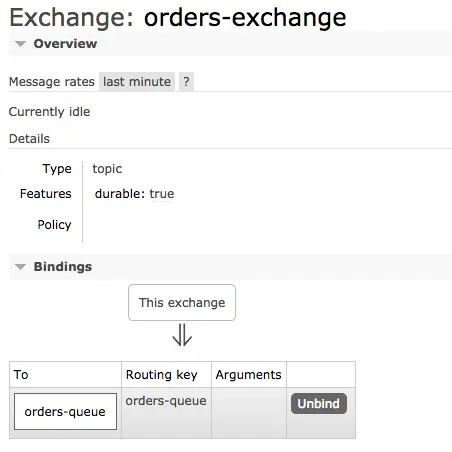
Here we are declaring a Queue with the name orders-queue and an Exchange with the name orders-exchange. We also defined the binding between orders-queue and orders-exchange so that any message sent to orders-exchange with a routing-key of orders-queue will be sent to orders-queue.
We can configure the RabbitMQ server details in application.properties as follows:
spring.rabbitmq.host=localhost
spring.rabbitmq.port=5672
spring.rabbitmq.username=guest
spring.rabbitmq.password=guest
Let us create a Spring bean, OrderMessageSender, to send a message to orders-exchange.
Spring Boot auto-configures the infrastructure beans required to send/receive messages to/from the RabbitMQ broker. We can simply autowire RabbitTemplate and send a message by invoking the rabbitTemplate.convertAndSend(“routingKey”, Object) method.
public class Order implements Serializable {
    private String orderNumber;
    private String productId;
    private double amount;

    //setters & getters
}
import org.springframework.amqp.rabbit.core.RabbitTemplate;
import org.springframework.beans.factory.annotation.Autowired;
import org.springframework.stereotype.Service;

@Service
public class OrderMessageSender {
    private final RabbitTemplate rabbitTemplate;

    @Autowired
    public OrderMessageSender(RabbitTemplate rabbitTemplate) {
        this.rabbitTemplate = rabbitTemplate;
    }

    public void sendOrder(Order order) {
        this.rabbitTemplate.convertAndSend(RabbitConfig.QUEUE_ORDERS, order);
    }
}
By default, Spring Boot uses org.springframework.amqp.support.converter.SimpleMessageConverter and serializes the object into a byte[].
Now, with this configuration in place, we can send a message to the RabbitMQ orders-queue by invoking the OrderMessageSender.sendOrder(Order) method.
After sending a message, you can view the message from the Administration UI application by logging in with guest/guest credentials. You can click on the Exchanges/Queues tabs to see that orders-exchange and orders-queue got created. You can also check the bindings for orders-exchange, which look like the following:
Now go to the Queues tab and click on orders-queue. Scroll down to the Get Messages section, and by clicking on the Get Message(s) button,
you can view the contents of the message.
Now, let’s create a Listener for the orders-queue using @RabbitListener.
Create a Spring bean, OrderMessageListener, as follows:
import org.slf4j.Logger;
import org.slf4j.LoggerFactory;
import org.springframework.amqp.rabbit.annotation.RabbitListener;
import org.springframework.stereotype.Component;

@Component
public class OrderMessageListener {

    static final Logger logger = LoggerFactory.getLogger(OrderMessageListener.class);

    @RabbitListener(queues = RabbitConfig.QUEUE_ORDERS)
    public void processOrder(Order order) {
        logger.info("Order Received: "+order);
    }
}
That’s it! By simply adding @RabbitListener and defining which queue to listen to, we can create a Listener.
Now, if you send a message to orders-queue, it should be consumed by the OrderMessageListener.processOrder() method, and
you should see the log statement “Order Received: “.
Sending and Receiving Messages as JSON Payloads
As we have seen, the default serialization mechanism converts the message object into a byte[] using SimpleMessageConverter, and
on the receiving end, it will deserialize the byte[] into the Object type (in our case, Order) using GenericMessageConverter.
In order to change this behavior, we need to customize the Spring Boot RabbitMQ auto-configured beans.
To send a message as JSON
One quick way to send a message as a JSON payload is by using ObjectMapper to convert the Order object into JSON and send it.
@Autowired
private ObjectMapper objectMapper;

public void sendOrder(Order order) {
    try {
        String orderJson = objectMapper.writeValueAsString(order);
        Message message = MessageBuilder
                            .withBody(orderJson.getBytes())
                            .setContentType(MessageProperties.CONTENT_TYPE_JSON)
                            .build();
        this.rabbitTemplate.convertAndSend(RabbitConfig.QUEUE_ORDERS, message);
    } catch (JsonProcessingException e) {
        e.printStackTrace();
    }
}
But converting objects into JSON like this is a kind of boilerplate. Instead, we can follow the approach below.
We can configure an org.springframework.amqp.support.converter.Jackson2JsonMessageConverter bean to be used by RabbitTemplate so that
the message will be serialized as JSON instead of a byte[].
@Configuration
public class RabbitConfig
{
    ...
    ...

    @Bean
    public RabbitTemplate rabbitTemplate(final ConnectionFactory connectionFactory) {
        final RabbitTemplate rabbitTemplate = new RabbitTemplate(connectionFactory);
        rabbitTemplate.setMessageConverter(producerJackson2MessageConverter());
        return rabbitTemplate;
    }

    @Bean
    public Jackson2JsonMessageConverter producerJackson2MessageConverter() {
        return new Jackson2JsonMessageConverter();
    }
}
Now, when you send a message, it will be converted into JSON and sent to the Queue.
To receive a message as JSON
In order to treat the message payload as JSON, we should customize the RabbitMQ configuration by implementing RabbitListenerConfigurer.
@Configuration
public class RabbitConfig implements RabbitListenerConfigurer {
    ...
    ...
    @Override
    public void configureRabbitListeners(RabbitListenerEndpointRegistrar registrar) {
        registrar.setMessageHandlerMethodFactory(messageHandlerMethodFactory());
    }

    @Bean
    MessageHandlerMethodFactory messageHandlerMethodFactory() {
        DefaultMessageHandlerMethodFactory messageHandlerMethodFactory = new DefaultMessageHandlerMethodFactory();
        messageHandlerMethodFactory.setMessageConverter(consumerJackson2MessageConverter());
        return messageHandlerMethodFactory;
    }

    @Bean
    public MappingJackson2MessageConverter consumerJackson2MessageConverter() {
        return new MappingJackson2MessageConverter();
    }
}
Handling Errors and Invalid Messages using Dead-Letter Queues (DLQ)
We may want to send invalid messages to a separate queue so that we can inspect and reprocess them later. We can use the DLQ concept to do this automatically, instead of manually writing the code to handle such scenarios.
We can declare the dead-letter-exchange and dead-letter-routing-key for a Queue while defining the Queue bean as follows:
@Configuration
public class RabbitConfig implements RabbitListenerConfigurer {

    public static final String QUEUE_ORDERS = "orders-queue";
    public static final String EXCHANGE_ORDERS = "orders-exchange";
    public static final String QUEUE_DEAD_ORDERS = "dead-orders-queue";

    @Bean
    Queue ordersQueue() {

        return QueueBuilder.durable(QUEUE_ORDERS)
                .withArgument("x-dead-letter-exchange", "")
                .withArgument("x-dead-letter-routing-key", QUEUE_DEAD_ORDERS)
                .withArgument("x-message-ttl", 15000) //if message is not consumed in 15 seconds, send to DLQ
                .build();
    }

    @Bean
    Queue deadLetterQueue() {
        return QueueBuilder.durable(QUEUE_DEAD_ORDERS).build();
    }

    ...
    ...
}
Now, if you try to send an invalid JSON message to orders-queue, it will be sent to dead-orders-queue.
You can find the source code for this article at https://github.com/sivaprasadreddy/sivalabs-blog-samples-code/tree/master/springboot-rabbitmq-demo
Related content
- MicroServices - Part 6 : Distributed Tracing with Spring Cloud Sleuth and Zipkin
- MicroServices - Part 5 : Spring Cloud Zuul Proxy as API Gateway
- MicroServices - Part 4 : Spring Cloud Circuit Breaker using Netflix Hystrix
- MicroServices - Part 3 : Spring Cloud Service Registry and Discovery
- MicroServices - Part 2 : Configuration Management with Spring Cloud Config and Vault