# MicroServices - Part 4 : Spring Cloud Circuit Breaker using Netflix Hystrix
Author: [Siva](https://www.sivalabs.in/) | Published: 2018-03-12 | Updated: 2026-11-10 | Topics: microservices, Spring Boot, springcloud | Canonical: https://www.sivalabs.in/blog/spring-cloud-netflix-circuit-breaker/
In the microservices world, to fulfill a client request one microservice may need to talk to other microservices.
We should minimize this kind of direct dependencies on other microservices but in some cases it is unavoidable.
If a microservice is down or not functioning properly then the issue may cascade up to the upstream services.
Netflix created Hystrix library implementing [Circuit Breaker](https://martinfowler.com/bliki/CircuitBreaker.html) pattern to address these kinds of issues.
We can use **Spring Cloud Netflix Hystrix Circuit Breaker** to protect microservices from cascading failures.
**MicroServices using Spring Boot & Spring Cloud**
* [Part 1 : MicroServices : Spring Boot & Spring Cloud Overview]({{< relref "2018-03-02-microservices-using-springboot-spring-cloud-part-1-overview.md" >}})
* [Part 2 : MicroServices : Configuration Management with Spring Cloud Config and Vault]({{< relref "2018-03-05-microservices-part-2-configuration-management-spring-cloud-config-vault.md" >}})
* [Part 3 : MicroServices : Spring Cloud Service Registry and Discovery]({{< relref "2018-03-08-microservices-springcloud-eureka.md" >}})
* [Part 4 : MicroServices : Spring Cloud Circuit Breaker using Netflix Hystrix]({{< relref "2018-03-12-spring-cloud-netflix-circuit-breaker.md" >}})
* [Part 5 : MicroServices : Spring Cloud Zuul Proxy as API Gateway]({{< relref "2018-03-15-microservices-part-5-spring-cloud-zuul-proxy-as-api-gateway.md" >}})
* [Part 6 : MicroServices : Distributed Tracing with Spring Cloud Sleuth and Zipkin]({{< relref "2018-03-20-microservices-part-6-distributed-tracing-with-spring-cloud-sleuth-and-zipkin.md" >}})
**In this post we are going to learn:**
* Implementing Circuit Breaker pattern using @HystrixCommand
* How to propagate ThreadLocal variables
* Monitoring Circuit Breakers using Hystrix Dashboard
# Implementing Netflix Hystrix Circuit Breaker pattern
From **catalog-service** we are invoking REST endpoint on **inventory-service** to get the inventory level of a product.
What if inventory-service is down? What if inventory-service is taking too long to respond thereby slowing down all the services depending on it?
We would like to have some **timeouts** and implement some **fallback mechanism**.
Add **Hystrix** starter to catalog-service.
```xml
org.springframework.cloud
spring-cloud-starter-netflix-hystrix
```
To enable Circuit Breaker add **@EnableCircuitBreaker** annotation on catalog-service entry-point class.
```java
import org.springframework.boot.SpringApplication;
import org.springframework.boot.autoconfigure.SpringBootApplication;
import org.springframework.cloud.client.circuitbreaker.EnableCircuitBreaker;
import org.springframework.cloud.client.loadbalancer.LoadBalanced;
import org.springframework.context.annotation.Bean;
import org.springframework.web.client.RestTemplate;
@EnableCircuitBreaker
@SpringBootApplication
public class CatalogServiceApplication {
@Bean
@LoadBalanced
public RestTemplate restTemplate() {
return new RestTemplate();
}
public static void main(String[] args) {
SpringApplication.run(CatalogServiceApplication.class, args);
}
}
```
Now we can use **@HystrixCommand** annotation on any method we want to apply timeout and fallback method.
Let us create **InventoryServiceClient.java** which will invoke inventory-service REST endpoint and
apply **@HystrixCommand** with a fallback implementation.
```java
import com.netflix.hystrix.contrib.javanica.annotation.HystrixCommand;
import com.sivalabs.catalogservice.web.models.ProductInventoryResponse;
import lombok.extern.slf4j.Slf4j;
import org.springframework.beans.factory.annotation.Autowired;
import org.springframework.http.HttpStatus;
import org.springframework.http.ResponseEntity;
import org.springframework.stereotype.Service;
import org.springframework.web.client.RestTemplate;
import java.util.Optional;
@Service
@Slf4j
public class InventoryServiceClient {
private final RestTemplate restTemplate;
@Autowired
public InventoryServiceClient(RestTemplate restTemplate) {
this.restTemplate = restTemplate;
}
@HystrixCommand(fallbackMethod = "getDefaultProductInventoryByCode")
public Optional getProductInventoryByCode(String productCode)
{
ResponseEntity itemResponseEntity =
restTemplate.getForEntity("http://inventory-service/api/inventory/{code}",
ProductInventoryResponse.class,
productCode);
if (itemResponseEntity.getStatusCode() == HttpStatus.OK) {
return Optional.ofNullable(itemResponseEntity.getBody());
} else {
log.error("Unable to get inventory level for product_code: " + productCode + ", StatusCode: " + itemResponseEntity.getStatusCode());
return Optional.empty();
}
}
@SuppressWarnings("unused")
Optional getDefaultProductInventoryByCode(String productCode) {
log.info("Returning default ProductInventoryByCode for productCode: "+productCode);
ProductInventoryResponse response = new ProductInventoryResponse();
response.setProductCode(productCode);
response.setAvailableQuantity(50);
return Optional.ofNullable(response);
}
}
```
```java
import lombok.Data;
@Data
public class ProductInventoryResponse {
private String productCode;
private int availableQuantity;
}
```
We have annotated the method from where we are making a REST call with **@HystrixCommand(fallbackMethod = "getDefaultProductInventoryByCode")**
so that if it doesn't receive the response within the certain time limit the call gets timed out and invoke the configured fallback method.
The fallback method should be defined in the same class and should have the same signature.
In the fallback method **getDefaultProductInventoryByCode()** we are setting the **availableQuantity** to 50, obviously,
this behavior depends on what business wants.
We can customize the **@HystrixCommand** default behavior by configuring properties using **@HystrixProperty** annotations.
```java
@HystrixCommand(fallbackMethod = "getDefaultProductInventoryByCode",
commandProperties = {
@HystrixProperty(name = "execution.isolation.thread.timeoutInMilliseconds", value = "3000"),
@HystrixProperty(name = "circuitBreaker.errorThresholdPercentage", value="60")
}
)
public Optional getProductInventoryByCode(String productCode)
{
....
}
```
Instead of configuring these parameter values in the code we can configure them in **bootstrap.properties/yml** files as follows.
```properties
hystrix.command.getProductInventoryByCode.execution.isolation.thread.timeoutInMilliseconds=2000
hystrix.command.getProductInventoryByCode.circuitBreaker.errorThresholdPercentage=60
```
Note that we are using the method name as the **commandKey** which is the default behavior. We can customize the **commandKey** name as follows:
```java
@HystrixCommand(commandKey = "inventory-by-productcode", fallbackMethod = "getDefaultProductInventoryByCode")
public Optional getProductInventoryByCode(String productCode)
{
...
}
```
```properties
hystrix.command.inventory-by-productcode.execution.isolation.thread.timeoutInMilliseconds=2000
hystrix.command.inventory-by-productcode.circuitBreaker.errorThresholdPercentage=60
```
You can find all the configuration options available here https://github.com/Netflix/Hystrix/wiki/Configuration.
# How to propagate ThreadLocal variables
By default, the methods with **@HystrixCommand** will be executed on a different thread because the default **execution.isolation.strategy**
is **ExecutionIsolationStrategy.THREAD**. So, the **ThreadLocal** variables we set before invoking **@HystrixCommand** methods won't be
available within **@HystrixCommand** methods.
One option to make the ThreadLocal variables available is using **execution.isolation.strategy=SEMAPHORE**.
```java
@HystrixCommand(fallbackMethod = "getDefaultProductInventoryByCode",
commandProperties = {
@HystrixProperty(name="execution.isolation.strategy", value="SEMAPHORE")
}
)
public Optional getProductInventoryByCode(String productCode)
{
...
}
```
If you set the property **execution.isolation.strategy** to **SEMAPHORE** then Hystrix will use semaphores instead of threads to limit
the number of concurrent parent threads that invoke the command.
You can read more about How Isolation Works here https://github.com/Netflix/Hystrix/wiki/How-it-Works#isolation.
Another option to make ThreadLocal variables available within Hystrix command methods is implementing our own **HystrixConcurrencyStrategy**.
Suppose you want to propagate some **CorrelationId** set as a ThreadLocal variable.
```java
public class MyThreadLocalsHolder {
private static final ThreadLocal CORRELATION_ID = new ThreadLocal();
public static void setCorrelationId(String correlationId) {
CORRELATION_ID.set(correlationId);
}
public static String getCorrelationId() {
return CORRELATION_ID.get();
}
}
```
Let us implement our own **HystrixConcurrencyStrategy**.
```java
@Component
@Slf4j
public class ContextCopyHystrixConcurrencyStrategy extends HystrixConcurrencyStrategy {
public ContextCopyHystrixConcurrencyStrategy() {
HystrixPlugins.getInstance().registerConcurrencyStrategy(this);
}
@Override
public Callable wrapCallable(Callable callable) {
return new MyCallable(callable, MyThreadLocalsHolder.getCorrelationId());
}
public static class MyCallable implements Callable {
private final Callable actual;
private final String correlationId;
public MyCallable(Callable callable, String correlationId) {
this.actual = callable;
this.correlationId = correlationId;
}
@Override
public T call() throws Exception {
MyThreadLocalsHolder.setCorrelationId(correlationId);
try {
return actual.call();
} finally {
MyThreadLocalsHolder.setCorrelationId(null);
}
}
}
}
```
Now you can set the **CorrelationId** before calling Hystrix command and access CorrelationId within Hystrix command.
**ProductService.java**
```java
public Optional findProductByCode(String code)
{
....
String correlationId = UUID.randomUUID().toString();
MyThreadLocalsHolder.setCorrelationId(correlationId);
log.info("Before CorrelationID: "+ MyThreadLocalsHolder.getCorrelationId());
Optional responseEntity = inventoryServiceClient.getProductInventoryByCode(code);
...
log.info("After CorrelationID: "+ MyThreadLocalsHolder.getCorrelationId());
....
}
```
**InventoryServiceClient.java**
```java
@HystrixCommand(fallbackMethod = "getDefaultProductInventoryByCode")
public Optional getProductInventoryByCode(String productCode)
{
...
log.info("CorrelationID: "+ MyThreadLocalsHolder.getCorrelationId());
}
```
This is just one example of how to propagate the data to the Hystrix command.
Similarly we can pass any data available in current HTTP Request, let's say by using Spring components like **RequestContextHolder** etc.
> Jakub Narloch wrote a nice article on how to propagate Request Context and even created a Spring Boot starter too. Please look at his blog https://jmnarloch.wordpress.com/2016/07/06/spring-boot-hystrix-and-threadlocals/ and GitHub Repo https://github.com/jmnarloch/hystrix-context-spring-boot-starter.
# Monitoring Circuit Breakers using Hystrix Dashboard
Once we add **Hystrix** starter to catalog-service we can get the circuits status as a stream of events using
Actuator endpoint http://localhost:8181/actuator/hystrix.stream, assuming catalog-service is running on 8181 port.
Spring Cloud also provides a nice dashboard to monitor the status of Hystrix commands.
Create a Spring Boot application with **Hystrix Dashboard** starter and annotate the main entry-point class with **@EnableHystrixDashboard**.
```xml
org.springframework.cloud
spring-cloud-starter-netflix-hystrix-dashboard
```
Let us say we are running Hystrix Dashboard on 8788 port, then go to http://localhost:8788/hystrix to view the dashboard.

Now in Hystrix Dashboard home page enter **http://localhost:8181/actuator/hystrix.stream** as stream URL and give Catalog Service as Title and click on Monitor Stream button.
Now invoke the catalog-service REST endpoint which internally invokes inventory-service REST endpoint and you can see the Circuit status along with how many calls succeed and how many failures occurred etc.
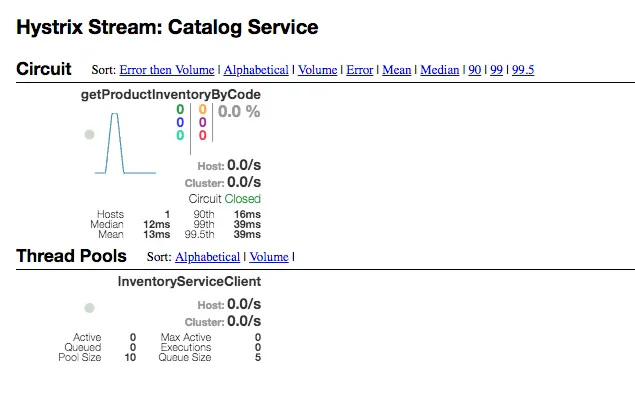
Instead of having a separate dashboard for every service we can use Turbine to provide a unified view of all services in a single dashboard.
For more details see http://cloud.spring.io/spring-cloud-static/Finchley.M7/single/spring-cloud.html#_turbine.
> You can find the source code for this article at https://github.com/sivaprasadreddy/spring-boot-microservices-series