
Spring AI : Structured Output
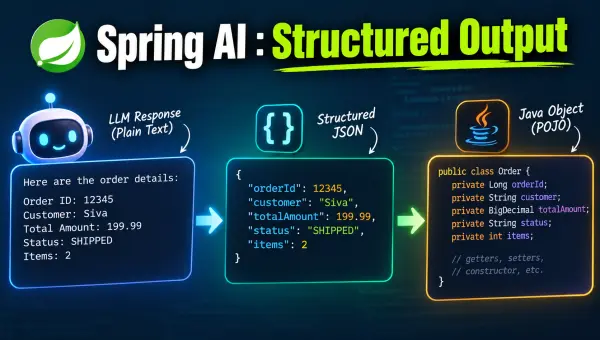
Chat models are great at producing prose, but most applications don’t want prose — they want a Java object, a List<String>, or a Map they can bind to a response and return from a REST API.
Spring AI’s Structured Output Converters bridge that gap: they turn plain-text chat responses into typed Java objects, without you having to hand-write a JSON parser or repeat “please respond with valid JSON” in every prompt.
Sample Code Repository
You can find the sample code for this article in the GitHub repository
The Need for Structured Output
An LLM only knows how to return text. If you ask it for “3 blog title suggestions”, you get back something like:
Supercharge your Spring Boot development, Unlock hidden productivity with Spring Boot, Ship faster with Spring Boot
To use that in your application, someone has to:
- Tell the model exactly what shape the response should be in (JSON, CSV, a schema, etc.)
- Parse the raw text response back into a Java type
- Handle the inevitable edge cases — markdown code fences around JSON, trailing text, etc.
Spring AI does all three for you via StructuredOutputConverter implementations — BeanOutputConverter, ListOutputConverter, and MapOutputConverter, and via the ChatClient.entity(...) convenience method built on top of them.
Generating a Tweet — the Easy Way
Let’s say we want the AI model to generate a tweet with some content and a list of hashtags:
record Tweet(String content, List<String> hashtags) {}
Here’s the whole endpoint:
@PostMapping("/ai/gen-tweet")
Tweet generateTweet(@RequestBody @Valid Input input) {
    Tweet tweet = chatClient
            .prompt()
            .system("""
                    You are an expert software developer and experienced content creator.
                    Your job is to generate interesting tweet based on the given input.

                    * Use a catchy first line to convey the essence of the input.
                    * Keep it concise and engaging.
                    * Maintain a professional tone.
                    * Use bullet points to list key features or benefits
                    * Use emojis where appropriate.
                    * Include relevant hashtags at the end.

                    Don't use Markdown syntax. Use plain text format.
                    """)
            .user(u ->
                    u.text("""
                        Generate a tweet for the following content:

                        {content}
                        """)
                    .param("content", input.prompt())
            )
            .call()
            .entity(Tweet.class);

    log.info("Generated tweet: {}", tweet);
    return tweet;
}
That one line .entity(Tweet.class) is doing all the heavy lifting.
Behind the scenes, Spring AI:
- Builds a
BeanOutputConverter<Tweet>from theTweetrecord - Appends its JSON format instructions to the prompt
- Sends the prompt to the model
- Parses the JSON response back into a
Tweetinstance
Calling it with the following prompt:
IntelliJ IDEA 2026.2 is released with a lot of new features such as Logpoints, Dependency completion in Gradle, Spring Security Inlays and Unlocking, Docker Compose improvements. Checkout https://www.jetbrains.com/idea/whatsnew/2026-2/ for more details.
generated the response which is converted into a Tweet instance:
Tweet[content=Ship faster with IntelliJ IDEA 2026.2 🚀
• 🐞 Logpoints for live debugging
• 🔗 Gradle dependency completion
• 🔐 Spring Security inlays & unlocking
• 🐳 Improved Docker Compose
More: https://www.jetbrains.com/idea/whatsnew/2026-2/
#IntelliJIDEA #JetBrains #Java #Gradle #Spring #Docker #IDE, hashtags=[#IntelliJIDEA, #JetBrains, #Java, #Gradle, #Spring, #Docker, #IDE]]
No manual parsing anywhere — a plain Java record came straight out of .entity(Tweet.class).
Using a Classpath Resource as the System Prompt
The system prompt tells the model how to behave, and can grow long. Instead of embedding it as a Java text block, load it from a resource file:
ChatController(ChatClient.Builder builder,
               @Value("classpath:/prompts/tweet-system-message.md")
               Resource tweetSystemMsgResource) {
    this.chatClient = builder.build();
    this.tweetSystemMsgResource = tweetSystemMsgResource;
}
The chatClient.prompt().system(tweetSystemMsgResource) accepts a Resource directly, so the prompt lives in its own file — easy to read, edit, and version separately from the controller code.
BeanOutputConverter — Behind the Scenes
The .entity(Tweet.class) is a shortcut. Here’s what it’s doing under the hood, spelled out explicitly:
@PostMapping("/ai/gen-tweet-2")
Tweet generateTweetV2(@RequestBody @Valid Input input) {
    PromptTemplate pt = new PromptTemplate("""
    Generate a tweet for the following content:

    {content}

    {format}
    """);

    BeanOutputConverter<Tweet> beanOutputConverter = new BeanOutputConverter<>(Tweet.class);
    String format = beanOutputConverter.getFormat();
    Map<String, Object> vars = Map.of("content", input.prompt(), "format", format);

    SystemMessage systemMessage = new SystemMessage(tweetSystemMsgResource);
    Message userMessage = pt.createMessage(vars);

    Prompt prompt = new Prompt(List.of(systemMessage, userMessage));
    String response = chatClient.prompt(prompt).call().content();

    Tweet tweet = beanOutputConverter.convert(response);
    log.info("Generated tweet: {}", tweet);
    return tweet;
}
The beanOutputConverter.getFormat() generates a JSON Schema for Tweet and wraps it in instructions. Here’s the actual text it produces:
Your response should be in JSON format.
Do not include any explanations, only provide a RFC8259 compliant JSON response following this format without deviation.
Do not include markdown code blocks in your response.
Remove the ```json markdown from the output.
Here is the JSON Schema instance your output must adhere to:
```{
  "$schema" : "https://json-schema.org/draft/2020-12/schema",
  "type" : "object",
  "properties" : {
    "content" : { "type" : "string" },
    "hashtags" : { "type" : "array", "items" : { "type" : "string" } }
  },
  "required" : [ "content", "hashtags" ],
  "additionalProperties" : false
}```
That text gets substituted into {format} in the prompt template, sent to the model as part of the user message, and the raw text response is handed to beanOutputConverter.convert(response), which parses the JSON into a Tweet.
The .entity(Tweet.class) does exactly this: same format string, same converter, same convert() call — just without the boilerplate.
Inspecting Requests and Responses with SimpleLoggerAdvisor
Since the format instructions get silently appended to your prompt, it’s useful to see exactly what’s being sent to the model.
SimpleLoggerAdvisor logs the full request and response:
this.chatClient = builder
        .defaultAdvisors(new SimpleLoggerAdvisor())
        .build();
Enable DEBUG logging for it in application.properties:
logging.level.org.springframework.ai.chat.client.advisor=DEBUG
With that in place, the tweet request logs the system message, the user message, and — separately — the injected format instructions as prompt context:
request: ChatClientRequest[prompt=Prompt{messages=[
  SystemMessage{textContent='You are an expert software developer...'},
  UserMessage{content='Generate a tweet for the following content: ...'}
], ...},
context={spring.ai.chat.client.output.format=Your response should be in JSON format. ...}]
And the response log shows the raw JSON the model returned, before it’s converted into a Tweet:
response: {
  ...
  "output" : {
    "text" : "{\n  \"content\": \"Ship faster with IntelliJ IDEA 2026.2 🚀...\",\n  \"hashtags\": [ \"#IntelliJIDEA\", \"#Java\", ... ]\n}"
  }
}
This is the fastest way to debug a structured output that isn’t parsing the way you expect — you can see precisely what instructions were sent and what the model actually replied with.
Spring AI Advisors
We will explore more about Spring AI Advisors in the upcoming articles.
ListOutputConverter
For a simple list of strings, you don’t need a whole record type — ListOutputConverter does the job:
@PostMapping("/ai/suggest-titles")
TitleSuggestionsResponse suggestTitles(@RequestBody @Valid TitleSuggestionsRequest req) {
    ListOutputConverter outputConverter = new ListOutputConverter();

    PromptTemplate pt = new PromptTemplate("""
    I would like to give a presentation about the following:

    {topic}

    Give me {count} title suggestions for this topic.

    Make sure the title is relevant to the topic and it should be a single short sentence.

    {format}
    """);

    Map<String, Object> vars = Map.of("topic", req.topic(), "count", req.count(),
            "format", outputConverter.getFormat());
    Message message = pt.createMessage(vars);
    String response = chatClient.prompt().messages(message).call().content();

    List<String> titles = outputConverter.convert(response);

    return new TitleSuggestionsResponse(titles);
}
Its format instructions are much simpler than BeanOutputConverter’s JSON schema — it just asks for comma-separated values:
Respond with only a list of comma-separated values, without any leading or trailing text.
Example format: foo, bar, baz
Calling POST /ai/suggest-titles with {"topic": "Spring Boot Tips and Tricks", "count": 3} returns:
{
  "titles": [
    "Supercharge your Spring Boot development",
    "Unlock hidden productivity with Spring Boot",
    "Ship faster with Spring Boot"
  ]
}
ListOutputConverter.convert(response) simply splits that comma-separated text into a List<String>.
MapOutputConverter
MapOutputConverter works the same way, but targets a Map<String, Object>:
@GetMapping("/ai/langs")
Map<String, Object> languages() {
    MapOutputConverter outputConverter = new MapOutputConverter();

    PromptTemplate pt = new PromptTemplate("""
    Return all popular programming languages and their inception year.

    {format}
    """);

    Map<String, Object> vars = Map.of("format", outputConverter.getFormat());
    Message message = pt.createMessage(vars);
    String response = chatClient.prompt().messages(message).call().content();

    Map<String, Object> languages = outputConverter.convert(response);
    log.info("Languages: {}", languages);
    return languages;
}
Its format instructions target a HashMap shape specifically:
Your response should be in JSON format.
The data structure for the JSON should match this Java class: java.util.HashMap
Do not include any explanations, only provide a RFC8259 compliant JSON response following this format without deviation.
Remove the ```json markdown surrounding the output including the trailing "```".
GET /ai/langs returns a real JSON map straight from the model:
{
  "Assembly": 1949,
  "Fortran": 1957,
  "Lisp": 1958,
  "ALGOL": 1958,
  "Python": 1991,
  "Java": 1995,
  "JavaScript": 1995,
  "Kotlin": 2011,
  "Rust": 2010,
  "TypeScript": 2012,
  "Zig": 2016
}
(trimmed — the model actually returns 60+ entries)
Native Structured Output
Everything so far relies on prompt engineering: the format instructions are just text appended to the prompt, and the model is trusted to follow them. That works with any model, but it’s still the model choosing to comply.
Some providers — including OpenAI — support structured output at the API level: you send a JSON Schema as part of the request itself, and the provider enforces it server-side, without needing extra prompt text.
Spring AI exposes this through ChatClient.EntityParamSpec.useProviderStructuredOutput():
Tweet tweet = chatClient
        .prompt()
        .system(tweetSystemMsgResource)
        .user(u -> u.text("""
                Generate a tweet for the following content:

                {content}
                """)
                .param("content", input.prompt()))
        .call()
        .entity(Tweet.class, spec -> spec.useProviderStructuredOutput());
With this flag set, Spring AI sends the Tweet JSON Schema as an API-level constraint (OpenAI’s response_format.json_schema) instead of stuffing it into the prompt text — no extra tokens spent on format instructions, and a stronger guarantee that the response actually matches the schema.
It’s not enabled by default, because support varies by provider and model:
- OpenAI’s Structured Outputs API doesn’t accept a top-level JSON array schema — so a bare
List<T>won’t work in native mode. Wrap it in a container record, or keep usingListOutputConverter. - Some Ollama models with a built-in reasoning/thinking mode can return plain text instead of JSON when this is enabled, breaking deserialization.
Given those caveats, the default prompt-based converters remain the safer, provider-agnostic choice — reach for useProviderStructuredOutput() when you know your target model supports it and want the stricter guarantee.
Summary
| Converter | Target type | Format instructions |
|---|---|---|
BeanOutputConverter<T> | Any Java bean/record | Full JSON Schema |
ListOutputConverter | List<String> | Comma-separated values |
MapOutputConverter | Map<String, Object> | JSON matching HashMap |
.entity(Class)onChatClientis a convenient shortcut over these converters — use it unless you need custom prompt wiring.SimpleLoggerAdvisor+DEBUGlogging is the quickest way to see exactly what format instructions and responses are flowing through your prompts.- For providers that support it,
spec.useProviderStructuredOutput()moves schema enforcement from the prompt into the API call itself.
Related Posts
Spring AI : Chat with LLMs
Calling an LLM is just an HTTP request. The trouble is that every provider has its own API, configuration, and response format. Spring AI handles that …
Support Me
If my articles, videos, or tutorials helped you solve a problem or learn something new, consider buying me a coffee. Your support helps me keep …
Conferences
I speak at developer conferences, Java user groups, meetups, and internal engineering events on Java, Spring Boot, Architecture, Testing, and …