
Remote debugging Spring Boot application

We all know how to run Spring Boot application in debug mode from our favorite IDEs(IntelliJ IDEA, Eclipse etc) and debug the code. Recently I had to debug a Spring Boot application which is running on a remote server.
There is already lot of information on the Internet on how to remote debug java applications, but some approaches didn’t work for me. So, here I would like to share my findings.
If application is running on localhost
Suppose you are running your application on localhost only and remote debug from your IDE.
$ export JAVA_OPTS='-agentlib:jdwp=transport=dt_socket,server=y,suspend=n,address=8787'
$ java $JAVA_OPTS -jar myapp.jar
You might have seen debug options specified as “-Xdebug -Xrunjdwp:transport=dt_socket,server=y,suspend=y,address=8787”. But in the newer versions of Java the preferred approach is “-agentlib:jdwp=transport=dt_socket,server=y,suspend=n,address=8787”
Now from Intellij IDEA you can remote debug the application by creating remote debug configuration by
Run -> Edit Configurations... -> Add New Configuration (Command + N) -> Enter Host and Port values
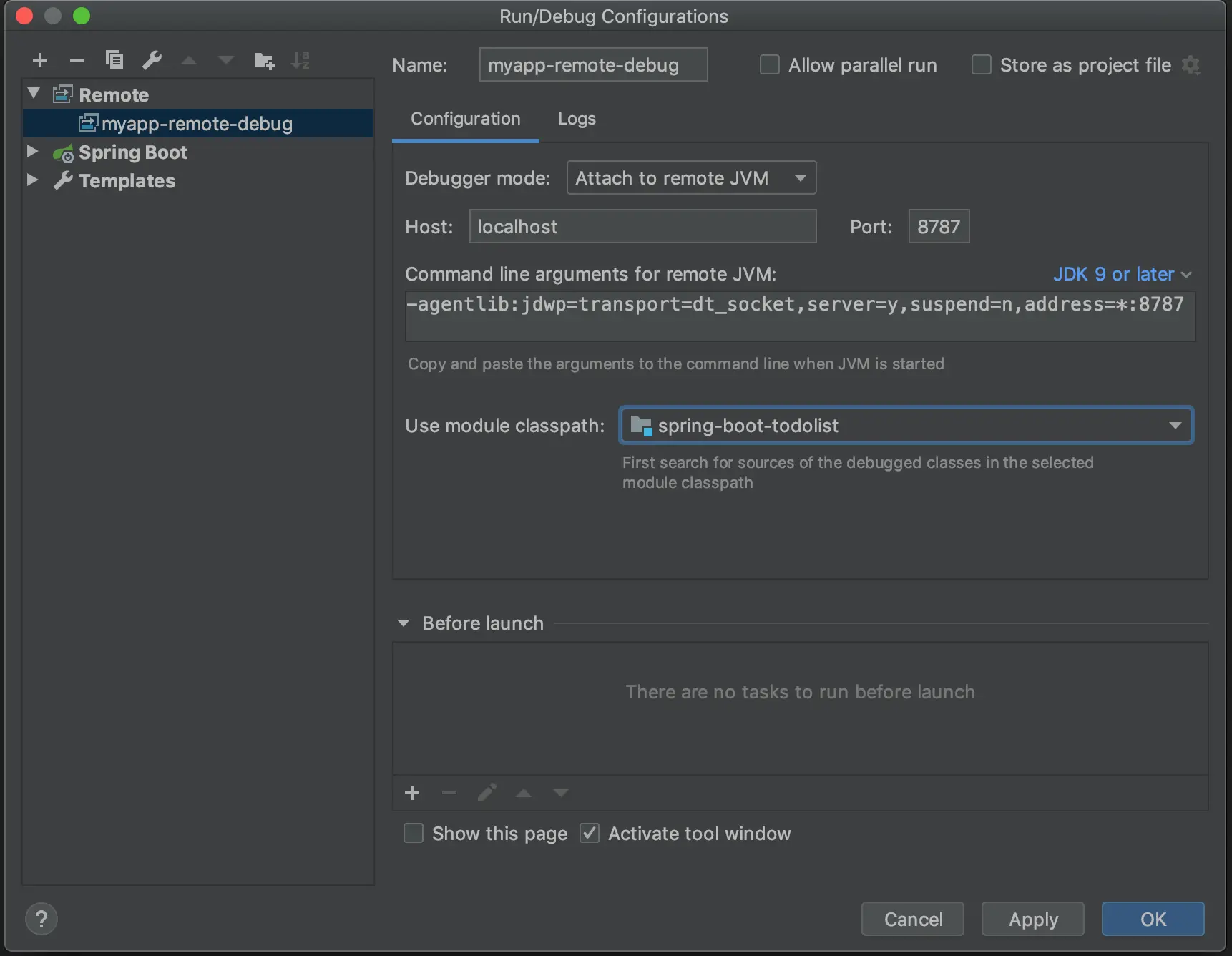
After creating debug configuration click on Debug, and you should see the following message:
Connected to the target VM, address: 'localhost:8787', transport: 'socket'
If application is running on remote host
Suppose you need to run the application on a remote host and debug from your localhost.
On Remote Server:
$ export JAVA_OPTS='-agentlib:jdwp=transport=dt_socket,server=y,suspend=n,address=8787'
$ java $JAVA_OPTS -jar myapp.jar
I followed the same approach as mentioned above and in debug configuration I gave the remote server’s IP address instead of localhost.
But, when I click on Debug I got the following error:
unable to open debugger port (198.xxx.xxx.xx:8787): java.net.ConnectException "Connection refused"
After a bit of googling I finally resolved the issue by starting the application on remote server as follows:
$ export JAVA_OPTS='-agentlib:jdwp=transport=dt_socket,server=y,suspend=n,address=0.0.0.0:8787'
$ java $JAVA_OPTS -jar myapp.jar
Note we gave the address as address=0.0.0.0:8787 instead of address=8787.
With this I am able to remote debug the application in the same way I did when I run it on localhost.
By the way, we can also run our Spring Boot application in debug mode as follows without creating jar file:
mvn spring-boot:run -Dspring-boot.run.jvmArguments="-agentlib:jdwp=transport=dt_socket,server=y,suspend=n,address=8787"
Happy debugging :-)
Related Posts
JOOQ Tutorials
jOOQ jOOQ Tutorial - 1 : Getting Started jOOQ Tutorial - 2 : Implementing CRUD Operations jOOQ Tutorial - 3 : Fetching One-to-One Relationships jOOQ …
Tutorials
Spring AI Spring AI : Chat with LLMs Spring AI : Structured Output Spring AI : Chat Memory Spring Boot Getting Started with Spring Boot Spring Boot …

Philip's Testing Spring Boot Applications Masterclass Course Review
If you ever worked on a large project which doesn’t have any tests then you know how painful it is to work on such codebase. You know what is …