Getting Started with SpringBoot in Intellij IDEA Community Edition
We can use IntelliJ IDEA Community Edition for working with Spring Boot applications, as we don’t need support for configuring servers like Tomcat, Wildfly, etc., and can simply run the applications by running the main() method.
However, there is no provision in IntelliJ IDEA Community Edition to create a Spring Boot application directly, the way it is supported in the Ultimate Edition.
We can go to http://start.spring.io/ and generate the project, and then import it into our IDE. But it would be nice to be able to create the Spring Boot project from the IDE itself.
One simple alternative I found to circumvent this problem is by using the Project Template support in IntelliJ IDEA.
For the first time, you can create the Spring Boot project from http://start.spring.io/ and import it into the IntelliJ IDE.
If you wish, you can add any other starters that you commonly use, configure properties like JDBC parameters, etc.
Now click on the menu Tools -> Save Project as Template. Enter a Name and Description for the template.
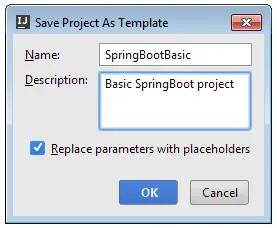
Once the template is created, we can use that template when creating new projects.
Select File -> New -> Project.
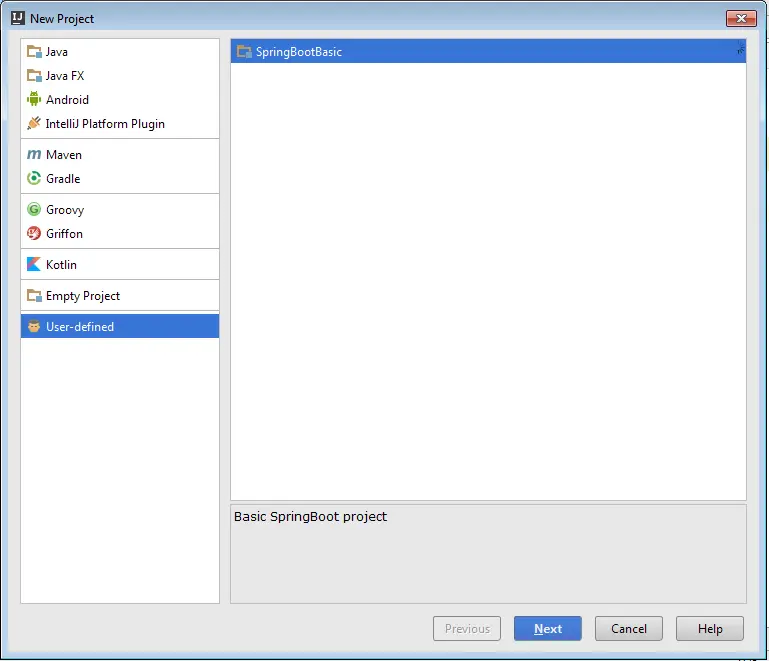
In the New Project Dialog, you can see a User-defined section. When you click on User-defined, you can see all the project templates we have created.
Select the SpringBootBasic template we created earlier, provide the project name, and click Finish.
Well, we won’t get any fancy Spring support features like the Ultimate Edition provides, but it will help us to get started quickly without requiring us to manually create a Maven/Gradle project, configure <parent>, etc.
Of course, this is not specific to Spring Boot only; we can create templates for any of our favorite tech stacks.
Happy coding. 🙂
Related content
- Update on SpringBoot : Learn By Example book
- My New Book SpringBoot : Learn By Example Published Today
- Creating Custom SpringBoot Starter for Twitter4j
- SpringBoot : Working with JOOQ
- SpringBoot : Working with MyBatis